A Digital First Mate on Board (WordPress Plug-in)
From Idea to Reality
Sometimes a project starts because you want to solve a problem. Sometimes it starts because you cannot find an existing solution that does exactly what you need. For me, it was the latter.
Over the past months, I have been working on an application called Phoenix Dashboard. I searched for existing solutions with the same combination of features, but I could not find a free alternative that matched my requirements. So I decided to build one myself.
The project revolves around the Phoenix, a steel motorboat with a special family history. The boat was built by my father and his brothers in the 1970s, and it is still actively used today. Because of that history, I wanted to create a digital dashboard that helps preserve trip information, tracks usage, and makes boating a little easier and more enjoyable.
The idea behind the application is intentionally simple: use a mobile phone or tablet on board the Phoenix, open the dashboard, and press Start Route when the trip begins. When the journey is finished, press Stop Route. Everything else is handled automatically.
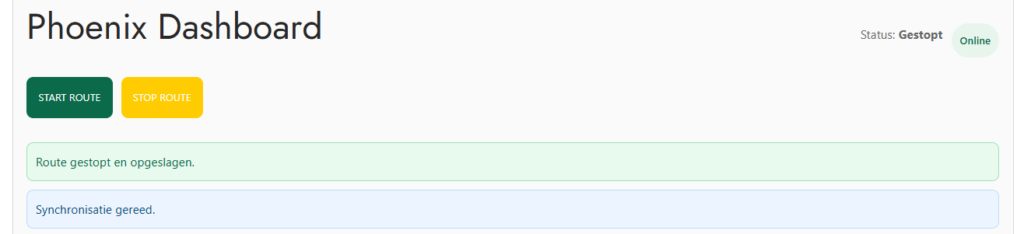
The application records the trip, processes the collected data, and automatically calculates key statistics.
Built for Real-World Conditions
One of the challenges of using software on a boat is that internet connectivity is not always reliable. Depending on the location, the connection may be weak, intermittent, or unavailable altogether. Because of this, reliability was a core design goal from the beginning. The application can temporarily store data locally on a mobile phone or tablet. If the internet connection disappears, newly recorded information remains safely stored in an internal queue. When connectivity becomes available again, the queued changes are automatically synchronized with the central system.
flowchart LR
    GPS[GPS Data] --> Queue[Local Queue]
    Queue --> Sync[Synchronization]
    Sync --> Database[Central Storage]

    Internet["Internet Available?"]
    Internet -->|Yes| Sync
    Internet -->|No| Queue
This approach ensures that the application remains functional even when sailing through areas with limited mobile coverage.
Making Smart Use of GPS
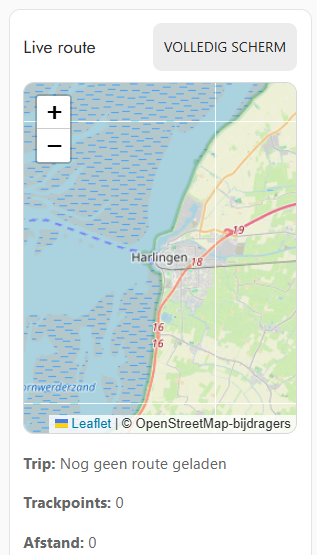
Most modern mobile devices include a built-in GPS receiver. Phoenix Dashboard takes full advantage of this capability. During an active trip, the application automatically records GPS track points. Using this data, it can calculate various metrics, including:
- Trip duration
- Distance traveled
- Average speed
- Estimated fuel consumption
- Route visualization on a map
This transforms the application into more than a simple trip recorder. It becomes a digital logbook that provides valuable insights into every journey.
Instant Insight During and After Every Trip
The dashboard provides an overview of the most important information at a glance:
- Active trip status
- Synchronization status
- Fuel consumption
- Distance traveled
- Current speed
- Most recently completed trip
What started as a simple tracking application has gradually evolved into a central information hub for the boat.
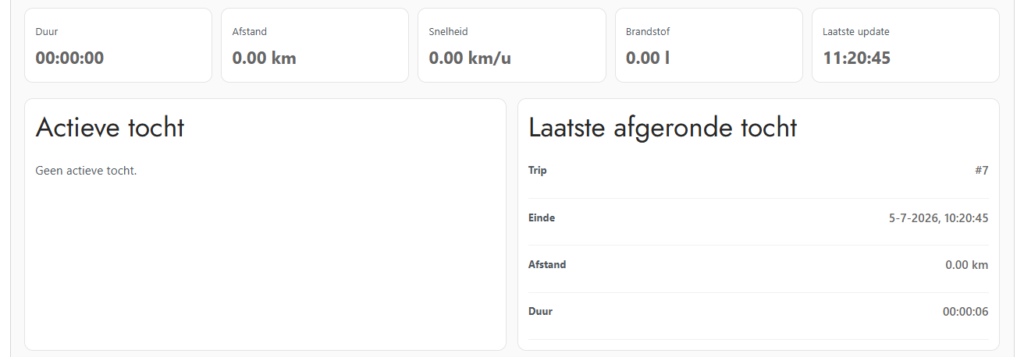
Recent trips are automatically stored, making it easy to review earlier journeys and compare performance over time.
Exporting and Sharing Routes
One feature I particularly enjoy is the ability to export recorded routes.
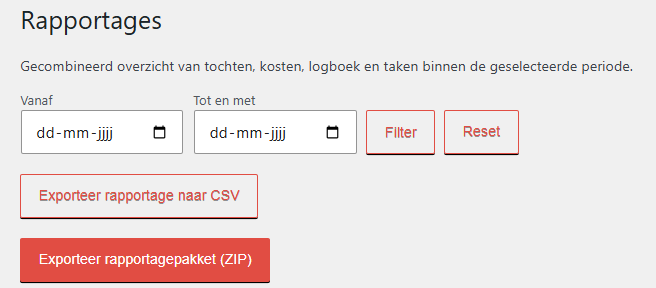
Users can download trip data as a GPX file or generate a complete reporting package containing all relevant information.

This makes it possible to:
- Analyze trips afterward
- Share routes with friends and family
- Archive sailing activities
- Import routes into mapping software
The administrator can export a complete reporting package containing all trip, cost, logbook, and task information for a selected date range.
Problems the Application Solves
The Phoenix Dashboard addresses several practical challenges at once.
| Challenge | Solution within Phoenix Dashboard |
|---|---|
| How much fuel remains after a trip? | Automatic fuel consumption estimates based on trip data. |
| Limited visibility into operating costs | Reports provide insights into both direct and indirect expenses. |
| No overview of completed routes | GPS tracking and route visualization on maps. |
| Difficulty sharing routes | Export routes as GPX files or complete ZIP packages. |
| Maintenance notes scattered across different places | Centralized task and issue tracking. |
Solution Architecture
flowchart TD
    Device[Phone or Tablet]
    Device --> Dashboard[Phoenix Dashboard]

    Dashboard --> GPS[GPS Sensor]
    Dashboard --> Queue[Offline Queue]
    Queue --> Storage[Central Storage]

    Storage --> Reports[Reports]
    Storage --> Maps[Route Maps]
Storage --> Tasks[Task Management]More Than Just a Dashboard
What I appreciate most about this project is how it has grown from a simple idea into something much more useful. Initially, my primary goal was to estimate how much fuel remained after a trip. Today, the application includes GPS tracking, offline synchronization, reporting, route export capabilities, and centralized task management. Even with all these features, the user experience remains straightforward:
- Start the route.
- Enjoy the journey.
- Stop the route when returning.
Everything else is recorded automatically.
Looking Ahead
The foundation is now in place. The application collects reliable data, handles unstable internet connections gracefully, and provides increasingly valuable insights into how the Phoenix is used. Over the coming months, I plan to continue using the system during real-world trips and discover which additional information could be helpful on board. For now, I am simply pleased to see how an idea that started with a practical problem has developed into a digital assistant that makes every trip easier to understand, monitor, and enjoy.
Download
Important: The Phoenix Dashboard plugin is currently designed for a single boat and a single owner. Multi-boat and multi-owner scenarios are not supported. If you need these capabilities, please contact me by email to discuss your requirements.